
Can I remove an address from the unsubscribe list?
Updated on November 27, 2026
Yes, if the person has subscribed again.
Software
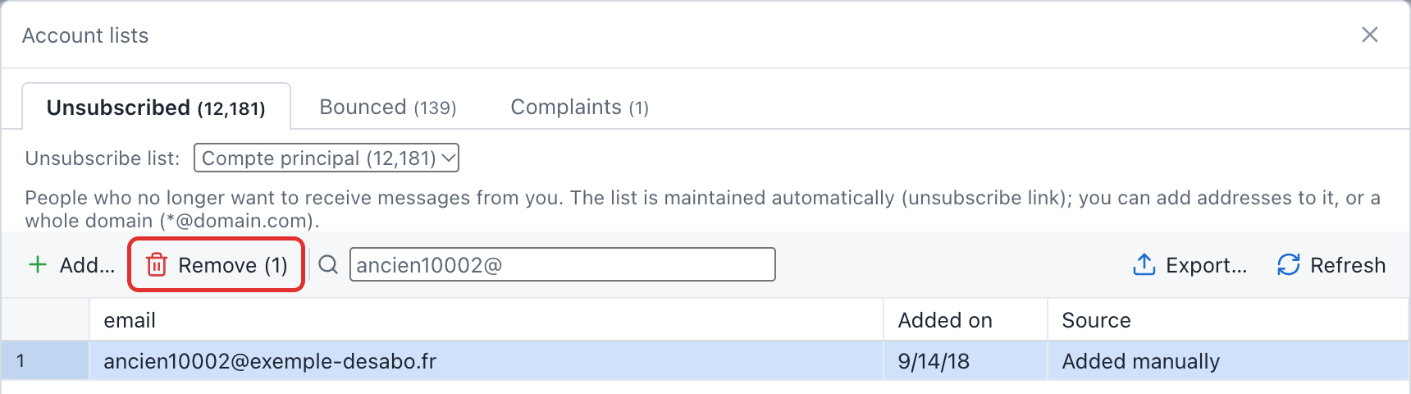
- In the ribbon, open the “Account” tab and click “Unsubscribed”.
- Find the address with the “Search for an address” field (Ctrl+F), select it, then click “Remove” (or press the Delete key).
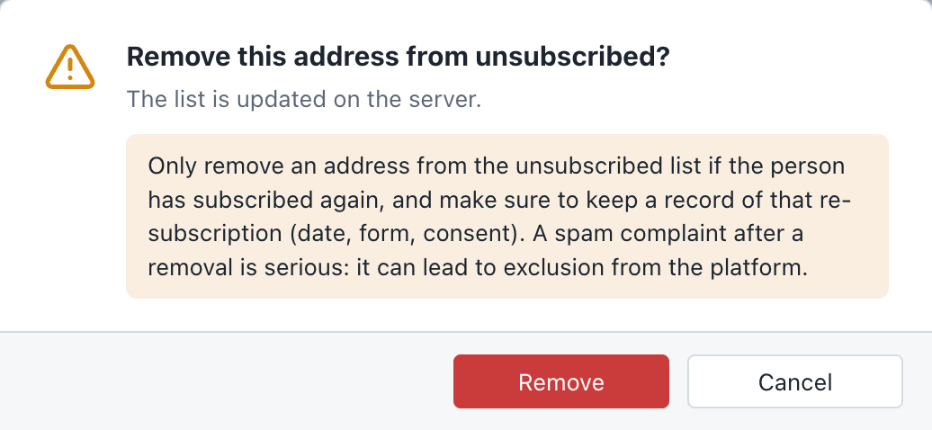
- Confirm by clicking “Remove”.
💡 Tip: from your campaign, you can also right-click the recipient’s row, then “Unsubscribed…” > “Remove selection from unsubscribed…”.
ℹ️ To remove more than 10 addresses at once, OxiMailing asks you to type their number to confirm, and keeps a copy of the removed addresses on your computer.
Web app
Open Contact Manager, then “Exclusion lists” > “Unsubscribed”. Click “Add / remove”, paste the address, then click “Remove from list”.
💡 Tip: the “Search…” field lets you find an address. The “Select” button then lets you remove the checked addresses from the list.
⚠️ Attention: always keep a record of the person’s re-subscription request: it must be explicit, written (email…) and dated. This way, you can justify sending new emails to this address.
Cases of spam complaints:
If the address was added to your unsubscribed list after a spam complaint, removing it from your unsubscribed list will have no effect.
Whether the spam report is intentional or accidental, the complainant’s address is added both to your unsubscribed list and to the red list (non-editable), which prevents any risk of a new complaint against the sender. Allowing emails to be sent again to someone who has previously filed a spam complaint could lead our email service provider partners (Hotmail, Yahoo, AOL…) to believe that complaints received through their feedback loop are not being handled in accordance with our commitments.
It is, among other things, the strict management of spam complaints that allows us to offer you an optimal deliverability level.