
The Antispam Analysis Reports an SPF Issue, What Is It?
Updated on November 28, 2026
Software
When you run the spam analysis (step “3 Checks”), it reports that the authentication of your sender domain is not complete, and SPF is not checked under your domain in the “Account” tab > “Domains”.
Web app
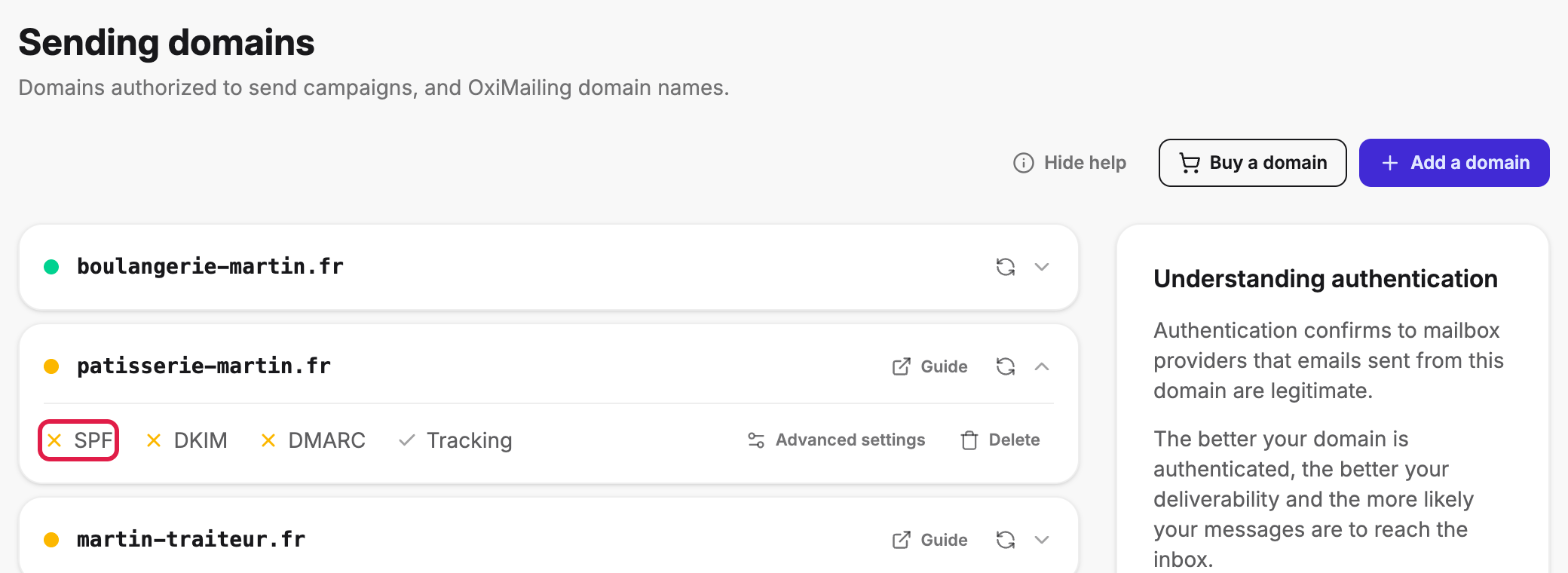
When you check your campaign, the antispam analysis tells you that the authentication of your sender domain is not complete, and, in “Settings” > “Domains”, “SPF” has an orange cross in front of it when you click on your domain:
Warning: This article, even in simplified terms, is quite technical. Do not hesitate to contact our support for free, personalized assistance from one of our technicians. To contact technical support, go to this page.
What is SPF?
SPF (Sender Policy Framework) is information, stored at your domain name level, which indicates which mail servers are authorized to send emails for it.
In other words, when you send an email with a sender address like “youraddress@yourcompany.com”, the servers that receive the messages will ask your domain (yourcompany.com) which mail servers are authorized to send emails on your behalf.
Three possibilities:
-
No SPF is recorded on your domain: you do not list the servers that are authorized to send for you, the blocking will not take place (it is advisable to add an SPF to your domain anyway).
-
An SPF is specified and it does not list our sending platform: as you sent your email via our platform, the email may possibly be filtered (in any case, it will be more sensitive to antispam filters).
-
An SPF is specified and it lists our sending platform in the list of authorized servers: no problem (but you probably shouldn’t be on this article!).
How to Add the OxiMailing Platform to Your SPF?
These technical modifications must be carried out by the person in charge of your domain name. You need to add the “include” mechanism below: include:spf.oximailing.com
In other words, if your SPF was: v=spf1 a mx ~all It should be: v=spf1 a mx include:spf.oximailing.com ~all
How to Verify?
First of all, be aware that the modification may take a few hours to be reflected everywhere. For safety, wait a few hours (ideally 24) before sending after modifying the SPF.
Software
You can make sure everything is fine in the “Account” tab > “Domains”: once the change has been applied, SPF will be checked under your domain. Click “Verify” to run the check again without waiting, then run the spam analysis again.
Web app
You can make sure everything is okay in “Settings” > “Domains”: once the modification has been reflected, the cross in front of “SPF” will become a check mark. Click the refresh button (the two circular arrows) on the domain’s row to run the check again right away.
Some tools to know the current value of your SPF as well as its validity (non-English speakers beware!)
Again, if you need assistance, do not hesitate to contact our support for free, personalized assistance from one of our technicians. To contact technical support, go to this page.