
OxiMailing / Google Analytics / Matomo integration...
Updated on November 28, 2026
Google Analytics is a particularly advanced tracking and statistics solution that allows you to track visitors on your site and the actions they take in near real-time. This tool is provided to you for free by Google.
Learn more: https://marketingplatform.google.com/about/analytics/.
Matomo is the Open Source equivalent of Google Analytics. Just as comprehensive and powerful, it can be hosted directly on your site to ensure complete data confidentiality and avoid sharing with third parties.
Learn more: https://matomo.org/
If you have installed Google Analytics or Matomo on your site, you can configure OxiMailing so that visitors coming from your email campaigns can be easily identified in your reports.
To do this, it’s very simple:
Software
In your campaign, step “2 Message”, click “Options” (top right of the message preview). In the “Visit tracking on your website (UTM)” part, check “Add UTM parameters to links”, then fill in the requested information:
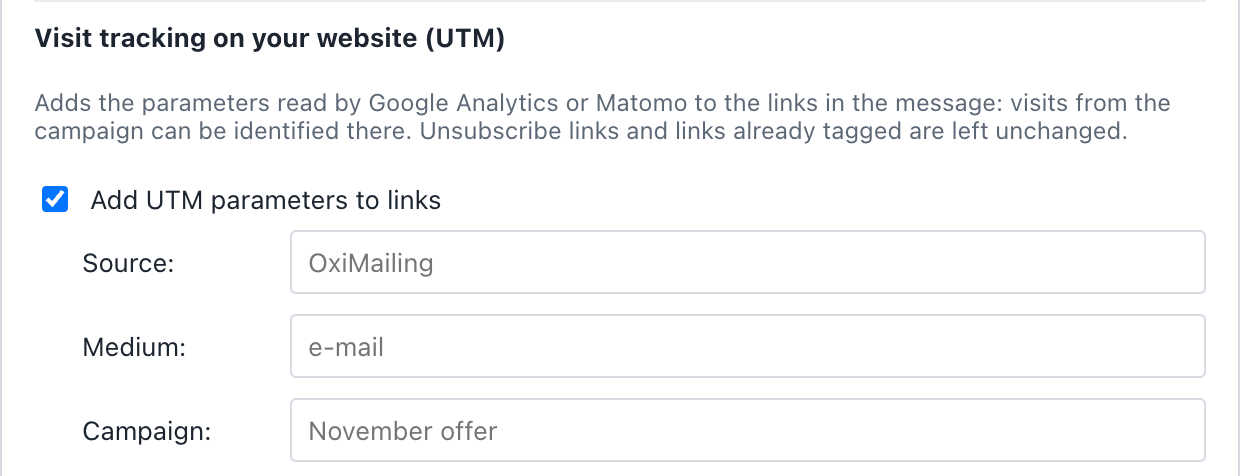
Keep the suggested values if you are unsure what to enter: the campaign then takes the name of your campaign.
Web app
Open your campaign and, in the “Advanced” section, check “Track visits with Google Analytics, Matomo…”, then fill in the requested information:
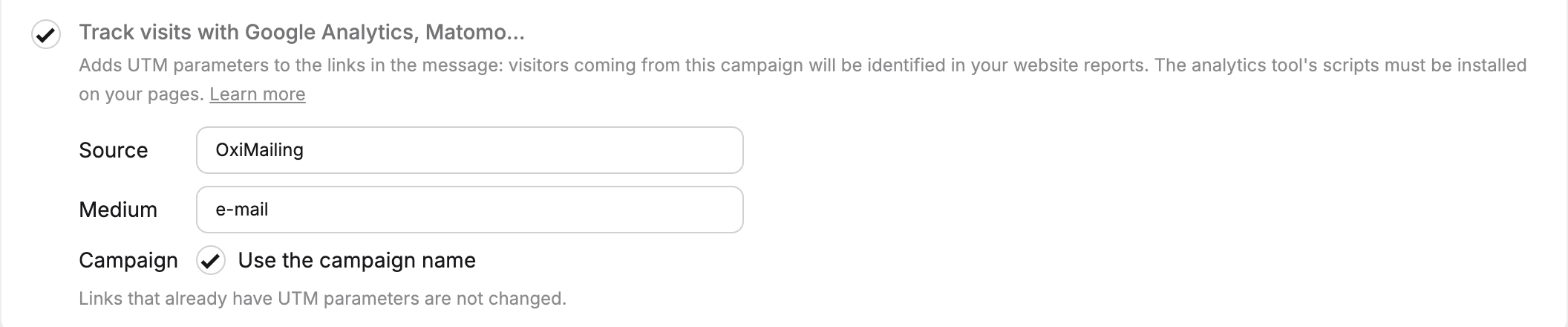
Keep the suggested values if you are unsure what to enter: the campaign then takes the name of your campaign.
Good to know: links that already carry UTM parameters and unsubscribe links are not modified. These settings are locked as soon as the first sending starts, so that your website statistics stay consistent.
Once the sending is done, you will see visitors from your email campaigns appear in your Analytics report. You can then filter on these to precisely track the actions of the recipients of your email campaigns on your site.