
How does the "response mode" work?
Updated on November 28, 2026
What is that?
The “Response” mode allows you to receive, directly in OxiSMS, the messages sent by your recipients in response to your SMS messages.
When a recipient replies to your message you will receive a message in your campaign. You can read answers directly in OxiSMS and export them to an Excel file for example.
How much does it cost?
The response mode is a free option! A text message sent in response mode will consume the same number of credits.
The answer is at the charge of the recipient at the cost of an SMS to Metropolitan France (excluding any extra cost).
How do I activate the response mode?
Software
In your campaign, step “2 Message”, check the “Allow replies” box:

The SMS will then be sent from a short number: a custom sender cannot receive replies.
Web app
In your campaign, in the “Message” section, just check the “Allow replies” box.
The SMS will then be sent from a short number: if you had customized the sender, that customization is removed.
Where can I consult the answers?
Software
Click “Results and replies” (step “5 Results”), then the “Replies” tab:
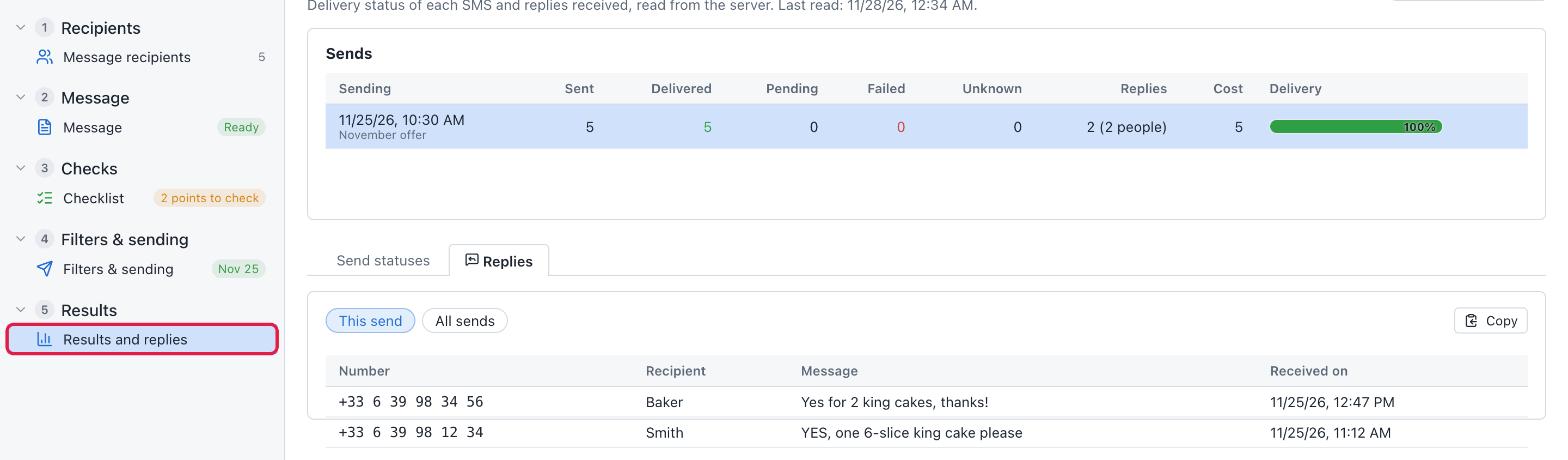
“This send” or “All sends” chooses the replies shown, and the “Copy” button copies them so you can paste them into Excel, for example.
Web app
Go to “Statistics”, open the campaign, then the “Replies” tab.
The “Export as CSV” button lets you retrieve all the replies (to open them in Excel, for example).
Important
- Your recipients have 48 hours after receiving your message to send their reply.
- It is not possible to customize the sender of text messages sent in reply mode.